Table of contents
- Overview
- What "This music can't be played due to recent licensing changes" means
- Where you see the error: as a viewer or as a creator
- Is it the song or your account? Three quick tests
- Why it happens
- What works when the song is blocked
- What does not work
- If you are just watching Reels
- The "not available in your region" version of the error
- Saving the audio of a Reel that still plays
- Frequently asked questions
- What does "This music can't be played due to recent licensing changes with the rights holder" mean?
- Is it my account or the song?
- Why does it only happen with some Reels?
- Will the music come back?
- Can a VPN fix it?
- Can I save the audio of a Reel that still plays?
- Conclusion
Seeing "This music can't be played due to recent licensing changes with the rights holder" on Instagram? Learn what it means and what actually works.
Quick answer: the message "This music can't be played due to recent licensing changes with the rights holder" means the company that owns the song changed or ended its licensing deal with Instagram, so the track can no longer be played or added. It is not a bug on your phone and reinstalling Instagram will not fix it. The practical fixes are to choose a different song, use Original audio, or check whether your account type or region is the limit.
You may see this notice on Reels you are watching, or when you try to add the song to your own Reel or Story. This guide explains what it really means, how to tell whether it is the song or your account, and what actually works, without the fixes that only waste your time.
What "This music can't be played due to recent licensing changes" means
Instagram does not own the music in its library. It licenses songs from record labels, publishers and distributors, and those agreements have limits: a start and end date, a list of countries, and rules about how a song can be used. When a rights holder renegotiates, lets a deal expire or has a dispute, Instagram has to stop playing the affected tracks. The text you see is exactly that situation: the song's licence changed, so the song is blocked.
⚠️ This music can't be played due to recent licensing changes with the rights holder.
Instagram does not tell users which label or deal is behind a specific song, and the details are usually not public. Reports of large catalogues disappearing during licensing disputes between publishers and social platforms do come up from time to time, but treat any claim about a specific cause with caution unless it comes from Instagram itself.


Where you see the error: as a viewer or as a creator
As a viewer, the Reel may play without sound, show a note that the audio is unavailable, or display the licensing message when you tap the audio name. You cannot change anything here. The audio is blocked for that Reel and it may return later or never.
As a creator, you may see the message when you search for the song, when you add it to a Reel or Story, or after posting when a song you used earlier is later removed. In that case your video can end up muted or with the audio replaced, which is why creators notice it more than viewers.
Is it the song or your account? Three quick tests
Before trying fixes, find out which problem you actually have. It takes about two minutes.
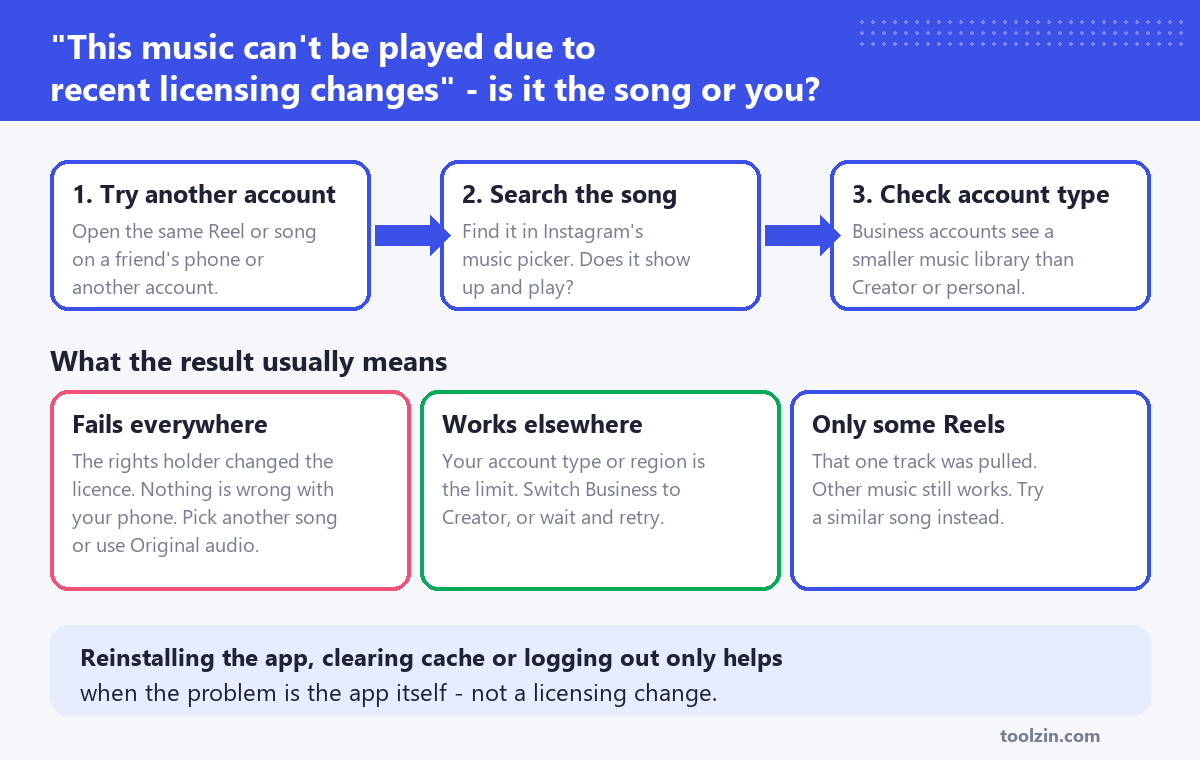
- Try another account or phone. Open the same Reel or song on a friend's phone, or on a second account of yours. If it fails there too, the song itself is blocked.
- Search for the song in the music picker. If it does not appear, or appears greyed out, the licence is the problem. If it plays, the Reel you saw may simply be using an older version of the track.
- Check your account type. Business accounts get a smaller music library than personal and Creator accounts because commercial use needs different rights. If the song works on a personal or Creator account but not on yours, this is the reason.
Why it happens
- A licence changed or expired. The rights holder and Instagram renegotiated or ended an agreement, so tracks were removed.
- Territory limits. A song may be licensed in some countries and not in others, which is the version of this problem that looks like "not available in your region".
- Account type. Business accounts cannot use much of the commercial catalogue.
- Original audio is restricted. If the Reel uses another creator's sound that contains licensed music, it can be muted when the underlying track is removed.
What works when the song is blocked
- Pick a similar song. Search the music picker for the same artist or genre. Many hits have several licensed versions, such as sped-up, remix or acoustic ones, and one of those may still be available.
- Use Original audio. Record your own voice or sound, or use audio from a Reel that is still playing. This is the most reliable fix for a Reel you are about to publish.
- Switch a Business account to Creator. If your use is not strictly commercial, a Creator account has access to a larger library. Changing it takes a minute in your account settings.
- Edit outside Instagram. Add music with a video editor that provides its own licensed tracks, then upload the finished video. Make sure you have the right to use the track you pick.
- Wait and try again later. If the song is important to you, check again after a few days. Licences are sometimes restored, but there is no guarantee.
What does not work
Many guides suggest reinstalling Instagram, clearing the cache, logging out or restarting your phone. These help only when the real problem is the app, for example when every song fails or the music library will not load. For a licensing message about one specific song, they change nothing. A VPN also does not help when the rights holder removed the track everywhere, and using one may break Instagram's terms.
If every song fails for you, try the general fixes: update Instagram, check your connection, and test on another device. If the problem continues, report it through the help options inside the app or on the Instagram Help Center.
If you are just watching Reels
There is nothing to fix on your side. The Reel's audio is blocked for licensing reasons and the creator may re-upload it with a different sound. You can also open the audio page of the Reel, which often shows whether other versions of the sound exist.
The "not available in your region" version of the error
A related message says that music is not available in your region. This one is about location: the song is licensed in some countries and not in yours. It affects the same people for different reasons, so the test above still applies: if the same song plays on an account set to another country, the region is the limit. Reinstalling or switching accounts does not change your country, and a VPN is the only workaround, with the terms-of-service risk mentioned above.
Saving the audio of a Reel that still plays
If a Reel plays normally on your screen and you want to keep its sound, for example to reuse it as a voice-over, you can extract the audio with the Instagram Audio Downloader. Paste the Reel link and download the audio. It works with publicly viewable Reels only. It cannot bring back a track that Instagram has removed or blocked, so it will not fix the licensing error itself, and you should only reuse audio you have the right to use. If you are looking for a song you heard in a Reel, the same tool helps you save that audio so you can search for it in your music app.
Frequently asked questions
What does "This music can't be played due to recent licensing changes with the rights holder" mean?
It means the label, publisher or distributor that owns the song changed or ended its licensing agreement with Instagram, so Instagram is no longer allowed to play that track in the place where you see the message. The problem is the song's licence, not your phone or your account.
Is it my account or the song?
Open the same song or Reel on another account or phone. If the message appears everywhere, it is the song. If it plays elsewhere, your account type (for example a Business account), your region or an app problem is more likely.
Why does it only happen with some Reels?
Licences are set per track and per region. When a rights holder pulls one song, only the Reels that use that song are affected. Other music keeps working normally.
Will the music come back?
Sometimes. Licensing deals are renegotiated, and a song can return after an agreement is renewed, but there is no fixed timeline and Instagram does not announce it. Do not wait on it for a post that is time sensitive.
Can a VPN fix it?
A VPN can help only when the song is blocked in your country. It does nothing when the rights holder has removed the track everywhere, and it may go against Instagram's terms, so it is not something we recommend.
Can I save the audio of a Reel that still plays?
If a Reel plays normally on your screen, you can extract its audio with the Instagram Audio Downloader. It works only for Reels that are publicly viewable and does not restore a song that Instagram has removed.
Conclusion
"This music can't be played due to recent licensing changes with the rights holder" is a licensing notice, not a technical fault. Test the song on another account, check your account type, and if the track is blocked, move on to a similar song or Original audio instead of reinstalling the app. Have you found another workaround? Share it in the comments below.
Created on 15 November, 2023
Related posts
Leave a comment

ADVERTISEMENT
Categories
Popular posts
ADVERTISEMENT
Comments (5)