Table of contents
- Overview
- What a hidden WhatsApp profile photo looks like
- 7 reasons you can't see a WhatsApp profile picture
- 1. Their privacy is set to "My contacts" and you are not saved in their phone
- 2. Their privacy is set to "Nobody"
- 3. They blocked you
- 4. They never set a profile photo
- 5. They removed or changed the photo
- 6. The number is not on WhatsApp (or the account is gone)
- 7. A problem on your side
- How WhatsApp profile photo privacy works
- Privacy setting or block? How to tell the difference
- Special cases: business accounts, groups and unknown numbers
- What you can do about it
- What not to do
- Frequently asked questions
- Can I see the profile picture of someone who blocked me?
- Does WhatsApp tell the person that I looked at their photo?
- Why can my friend see the photo but I can't?
- The photo shows for some contacts but is grey for others. Is something wrong with my app?
- Can I tell which privacy setting someone picked?
- Conclusion
Can't see someone's WhatsApp profile photo? Learn the 7 real reasons, from privacy settings to a block, how to tell the difference and what to do.
You open a chat, tap the contact's name, and instead of a photo you get a plain grey avatar. Maybe it was there yesterday. Maybe you have never seen it at all. The first thought is usually "did they block me?", but that is only one of seven possible explanations, and not the most common one.
This guide walks through every reason a WhatsApp profile picture (DP) can be missing, shows how to tell a privacy setting apart from a block, and lists what you can do about it, without apps that promise to "unlock" hidden photos.
What a hidden WhatsApp profile photo looks like
When you cannot see someone's picture, WhatsApp shows its default avatar: a light grey circle with a simple person silhouette. It looks exactly the same whether the person has no photo, hides it from you, or has blocked you. That is the reason this problem is confusing: one symptom, several different causes.
7 reasons you can't see a WhatsApp profile picture
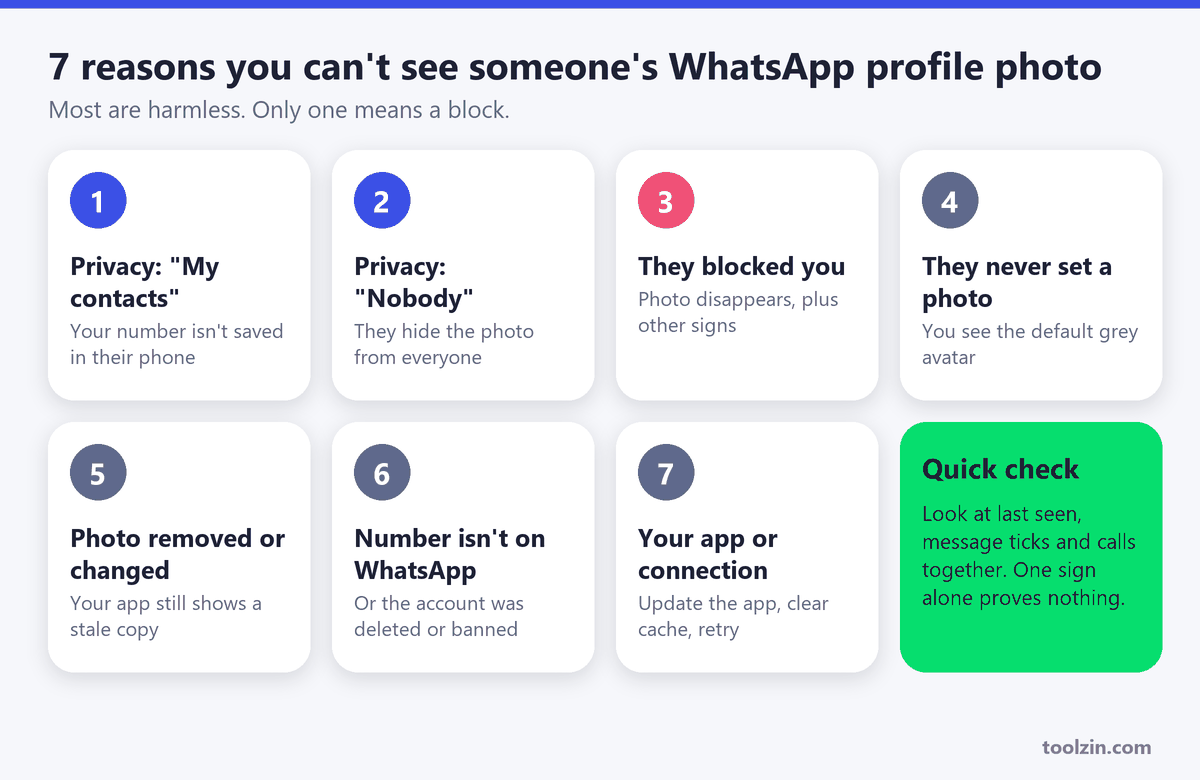
1. Their privacy is set to "My contacts" and you are not saved in their phone
This is the most common reason. WhatsApp lets everyone choose who can see their profile photo. If they pick My contacts, only people whose number is saved in their phone's address book can see it. You can have their number saved in yours and still see nothing, because what counts is whether your number is in their contacts. New acquaintances, delivery drivers, clients and group members you never added fall into this group.
2. Their privacy is set to "Nobody"
Some people hide the photo from everyone, including their closest friends. Nothing is wrong with your account, and nothing you do can change it. The only way to see it is for the person to change the setting.
3. They blocked you
A block is the reason people worry about, and it does remove the photo from your view. When you are blocked you usually stop seeing the profile picture, last seen, online status and new status updates. The problem is that these are also affected by the privacy settings above, so the photo alone cannot prove a block. We compare the signs further down.
4. They never set a profile photo
It sounds obvious, but a large share of WhatsApp accounts never upload a picture. Business numbers, old accounts and secondary SIMs are typical examples. If the person has never had a photo, you will see the default avatar forever.
5. They removed or changed the photo
If someone deletes their photo, the avatar returns to grey. If they replace it, your phone may keep showing the old copy for a while, because WhatsApp stores a cached version of profile pictures. Closing the chat, reopening it, or pulling the contact info screen down to refresh usually brings in the new picture.
6. The number is not on WhatsApp (or the account is gone)
A typo in a digit, a missing country code, a number that changed hands, or an account that was deleted or banned will all give you an empty avatar. Before assuming anything about the person, confirm that the number is really registered on WhatsApp. You can do that in seconds with the free WhatsApp Checker.
7. A problem on your side
A slow connection, an outdated app, a full phone storage or a corrupted cache can stop pictures from loading. If every contact suddenly shows grey avatars, this is almost certainly the cause. Update WhatsApp, check your internet, and reopen the app.
How WhatsApp profile photo privacy works
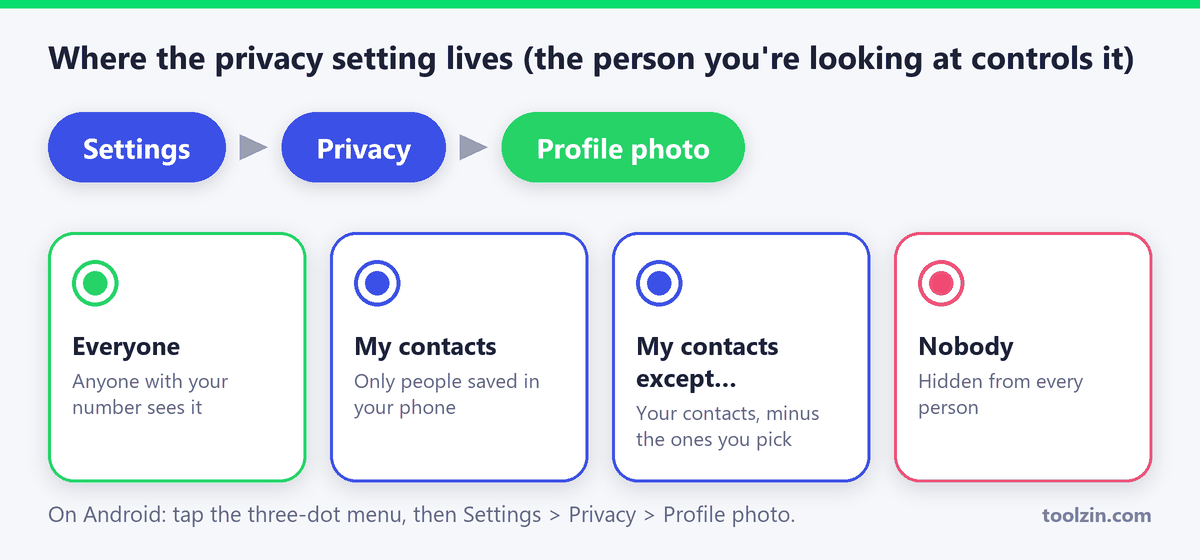
The photo is controlled only by the person who owns it. Under Settings > Privacy > Profile photo they can choose between four options: Everyone, My contacts, My contacts except... and Nobody. You cannot see or change another person's choice, and WhatsApp does not tell you which one they picked.
If you want to control your own picture the same way, our guide on how to hide your WhatsApp profile picture from non-contacts covers the steps on Android and iPhone.
Privacy setting or block? How to tell the difference
WhatsApp never notifies you about a block, so the only option is to look at several signs together. No single one is proof.
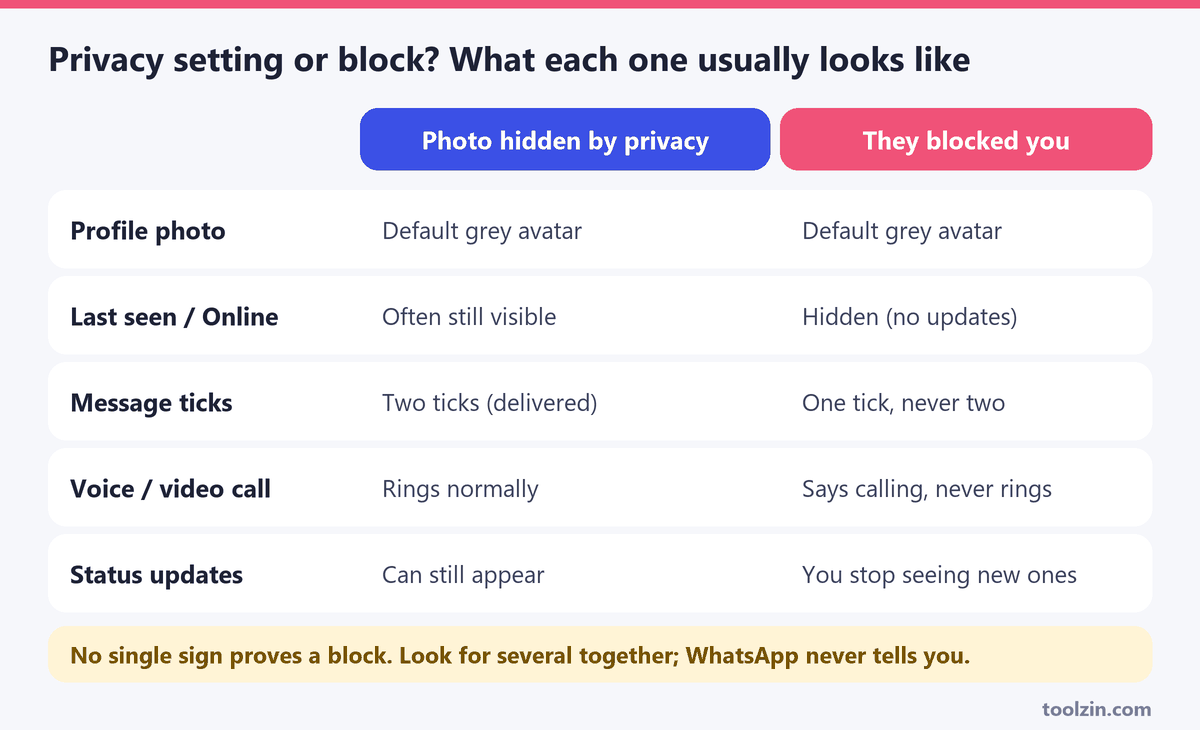
- Message ticks: if your messages always show a single tick and never turn into two, they are not being delivered. This is a strong sign of a block (or of the person's phone being off for a very long time).
- Calls: a voice or video call that says "calling" and never starts ringing on the other side points the same way.
- Last seen and online: if these disappear together with the photo, a block becomes more likely. If you still see them, the photo is probably just hidden by privacy.
- Status updates: new statuses stop showing up when you are blocked.
Two or three of these signs at the same time make a block likely. Only the photo missing, with everything else normal, almost always means a privacy setting.
Special cases: business accounts, groups and unknown numbers
Business accounts usually use their logo as the profile photo, and many leave it visible to everyone so customers can recognise them. They can still restrict it, so a missing logo is not unusual. Group pictures work differently: a group icon is normally visible to the people in the group, so if you left or were removed you may only see the default group icon. And when a message comes from a number you have never saved, a missing photo is completely normal, because the sender may be using "My contacts" while you are a stranger to their phone.
What you can do about it
- Check the number first. Make sure it includes the country code and is registered on WhatsApp with the WhatsApp Checker.
- Refresh your side. Update the app, restart your phone and reopen the chat. Cached images are a common cause of missing or outdated photos.
- Ask the person. A short message such as "I can't see your photo, do you have me saved?" often settles it. If they save your number, a "My contacts" setting will start working for you straight away.
- Save your own number with them. If you are a client, seller or organiser, give contacts a reason to save you. It is also how you make your own photo visible to people who use "My contacts".
- If the picture is public, view it larger. When a photo is visible but tiny, our WhatsApp DP Downloader opens the full-size version. It only works for pictures that are publicly visible and does not bypass anyone's privacy. For details, see how to download and save a WhatsApp profile picture.
What not to do
You will find websites, apps and videos that claim to reveal a hidden WhatsApp photo or "unblock" a profile picture. A photo that a person has restricted is not sent to your device, so there is nothing for a tool to unlock. These offers are usually surveys, fake download pages or attempts to collect your number and login codes. Do not install them, do not share the six-digit verification code WhatsApp sends you, and do not pay for anything that promises this.
Frequently asked questions
Can I see the profile picture of someone who blocked me?
No. When you are blocked, you normally stop seeing their profile photo and its updates. If a photo is still displayed for a while, it is most likely a cached copy on your phone.
Does WhatsApp tell the person that I looked at their photo?
No. WhatsApp does not send a notification when you open someone's profile picture.
Why can my friend see the photo but I can't?
Because visibility is decided per person. The owner can hide the picture from you while showing it to your friend, for example when your friend is saved in their contacts and you are not, or when they used the "My contacts except..." option.
The photo shows for some contacts but is grey for others. Is something wrong with my app?
Not usually. Each person chooses their own privacy setting, so a mix of photos and grey avatars is normal. If every contact turns grey at once, then it is a problem on your side such as connection or app version.
Can I tell which privacy setting someone picked?
No. WhatsApp does not show another person's setting. You can only guess from the other signs: last seen, ticks, calls and whether you are saved in their contacts.
Conclusion
A missing WhatsApp profile photo is far more often a privacy choice, a missing contact entry or a cached image than a block. Check the number, refresh your app, look at ticks and call behaviour together, and when in doubt, simply ask. For everything that is public, the tools on Toolzin let you check numbers and view profile pictures in full size, while respecting each person's privacy settings.
Created on 27 October, 2026
Related posts
Leave a comment

ADVERTISEMENT
Categories
Popular posts
ADVERTISEMENT